
Samsung continues to refine its smartphone experience with every major software update, and One UI 9 is shaping up to be one of the company’s most exciting releases in years. Built on Android 17, One UI 9 introduces a wide range of improvements, including smarter AI tools, enhanced privacy features, a redesigned interface, better multitasking capabilities, improved gaming controls, accessibility enhancements, and several upgrades to Samsung’s core applications.
While many Galaxy users are still getting accustomed to previous updates, Samsung is already pushing the boundaries with One UI 9, aiming to create a smoother, smarter, and more personalized smartphone experience. Rather than focusing on just one major feature, the update improves nearly every aspect of the operating system.
From a brand-new Driving Report system to enhanced browser AI, customizable Quick Settings, upgraded Samsung DeX, and powerful accessibility tools, One UI 9 offers meaningful improvements that users will notice every day.
This detailed guide explores all the important features, improvements, and changes coming with One UI 9, along with how they impact Samsung Galaxy users.
What Is One UI 9?
One UI 9 is Samsung’s latest custom Android skin based on Android 17. It serves as the software layer that sits on top of Android and provides Samsung-exclusive features, visual designs, customization options, and productivity tools.
The goal of One UI 9 is not simply to add flashy features. Instead, Samsung appears focused on improving usability, simplifying navigation, strengthening privacy, and integrating AI more deeply throughout the system.
The update introduces both major and minor enhancements that collectively make Galaxy devices feel more polished and intelligent.
One UI 9 Driving Report: A New Way to Improve Driving Habits
One of the most interesting additions in One UI 9 is the new Driving Report feature.
This feature automatically starts monitoring your driving activity whenever your Galaxy smartphone connects to your vehicle’s Bluetooth system.
How Driving Report Works

Once connected:
- Trip tracking begins automatically
- Live notifications appear during the drive
- Travel duration is recorded
- Driving behavior is analyzed
The system monitors:
- Rapid acceleration
- Sudden braking
- Sharp turns
- Phone usage while driving
- Maximum speed reached
After each trip, users receive a detailed summary of their driving performance.
Weekly Driving Analysis
At the end of every week, One UI 9 compiles all collected data into a comprehensive report.
The report includes:
- Driving trends
- Habit analysis
- Safety recommendations
- Performance improvements
This transforms a Galaxy smartphone into a personal driving assistant.
Dual Camera Video Recording Gets Better

Content creators will appreciate the upgraded dual-camera recording mode in One UI 9.
Samsung now allows users to capture video using both front and rear cameras simultaneously in a more intuitive layout.
Benefits of the New System
Users can:
- Record reactions and surroundings together
- Create vlog-style content easily
- Use front and rear cameras side-by-side
- Zoom using the rear camera while recording
This feature is particularly useful for:
- Travel vloggers
- Interview recordings
- Tutorial creators
- Social media influencers
The only limitation is that recording currently tops out at 1080p resolution.
Also Read This One UI 8.5: Complete Guide to New Features, Hidden Tricks, and Smart Upgrades
A Cleaner and More Organized User Interface

One of the first things users will notice about One UI 9 is the cleaner interface.
Samsung has redesigned numerous menus throughout the operating system.
Reduced Visual Clutter
Many menus now display only titles instead of lengthy descriptions.
Benefits include:
- Faster navigation
- Cleaner appearance
- Less screen clutter
- Better readability
Improved Organization
Settings and options are now grouped more effectively.
Users can find features faster because categories are separated more clearly.
More Information on Screen
Samsung has condensed many cards and menus, allowing:
- More visible options
- Less scrolling
- Better productivity
- Improved efficiency
Although these changes may seem minor individually, together they significantly improve the overall experience of One UI 9.
Floating Pill-Shaped Navigation Elements

Samsung continues its modern design evolution with floating navigation bars.
These floating pill-shaped elements appear throughout various Samsung apps and system menus.
Advantages
The design offers:
- Cleaner visuals
- Better content visibility
- Modern aesthetics
- Enhanced usability
Because the navigation bars no longer attach directly to the screen edge, users gain slightly more viewing space.
This subtle enhancement contributes to the refined feel of One UI 9.
Quick Settings Panel Gets a Major Redesign

The Quick Settings panel receives one of the biggest upgrades in One UI 9.
Samsung has focused heavily on customization and usability.
New Music Player Design
The media player now features:
- Updated icons
- Refined layouts
- Better typography
- Improved controls
Most notably, colorful waveform animations now appear during playback.
These animations add visual energy and make media controls more engaging.
Better Brightness and Volume Controls

Samsung has redesigned the brightness and volume sliders.
What’s New?
Users now get:
- Larger sliders
- Dedicated control space
- Easier adjustments
- Better accessibility
Previously attached toggles have been separated for greater flexibility.
This provides cleaner controls and improved customization.
Enhanced Quick Settings Customization
Perhaps the biggest Quick Settings improvement is flexibility.
Users can now:
- Resize sliders
- Adjust layouts
- Modify panel appearance
- Customize widget sizes
The music player itself can also be resized.
This level of customization makes One UI 9 feel significantly more personal.
Smarter Samsung Internet Browser AI

Artificial intelligence continues expanding throughout Samsung’s ecosystem.
The Samsung Internet Browser gains a powerful AI enhancement in One UI 9.
Ask Questions About Any Webpage
Instead of being limited to:
- Summarize
- Translate
- Highlights
Users can now ask custom questions directly about webpage content.
Examples include:
- What is this article about?
- What are the key points?
- Can you explain this topic?
- What are the conclusions?
This effectively turns the browser into a built-in research assistant.
Multiple Browser Windows as Separate Apps
Another excellent productivity feature allows browser windows to function independently.
Benefits
Users can:
- Open multiple web sessions
- Switch via Recent Apps
- Improve multitasking
- Separate work and personal browsing
This small feature greatly improves productivity on larger Galaxy devices.
Stronger Security Protections

Samsung has introduced several security enhancements within One UI 9.
Improved Power Menu Security
If users open the power menu and then exit without taking action:
- Device locks automatically
- Biometrics become temporarily unavailable
- Password entry is required
Similarly:
- Restarting requires authentication
- Powering off requires authentication
This helps prevent unauthorized access.
Better App Installation Monitoring
A new security menu tracks apps installed outside official stores.
This section helps users:
- Identify sideloaded apps
- Review installation sources
- Improve security awareness
Although still developing, this feature could become extremely valuable in future releases.
Gaming Enhancements in One UI 9

Mobile gamers receive several welcome improvements.
Samsung’s Game Booster has been expanded significantly.
New Controls
Gamers can customize:
- Resolution settings
- Performance profiles
- Resource allocation
- Optimization modes
These additions help users balance performance, battery life, and device temperature.
AI Scam Protection During Calls
Phone scams remain a major problem worldwide.
To combat this, Samsung has strengthened AI call monitoring capabilities.
Real-Time Scam Detection
The AI can identify:
- Financial pressure tactics
- Password requests
- Personal information scams
- Fraudulent behavior
When suspicious activity is detected, users receive warnings.
Privacy Control
Those uncomfortable with AI monitoring can disable the feature at any time.
This flexibility makes the feature useful without being intrusive.
Unified Call History

Another useful improvement allows third-party communication apps to integrate more deeply.
Calls from:
- Telegram
- Google Meet
can now appear within the Phone app’s recent calls section.
Benefits include:
- Centralized call management
- Better organization
- Easier communication tracking
This helps simplify daily phone usage.
Internet Access Controls for Apps
One hidden gem in One UI 9 is Network Restrictions.
Users can now block specific apps from accessing the internet.
Practical Uses
Ideal for:
- Offline games
- Alarm apps
- Utility tools
- Privacy-sensitive applications
Benefits include:
- Reduced tracking
- Improved privacy
- Lower data usage
- Better battery efficiency
Power users will especially appreciate this feature.
Samsung DeX Improvements
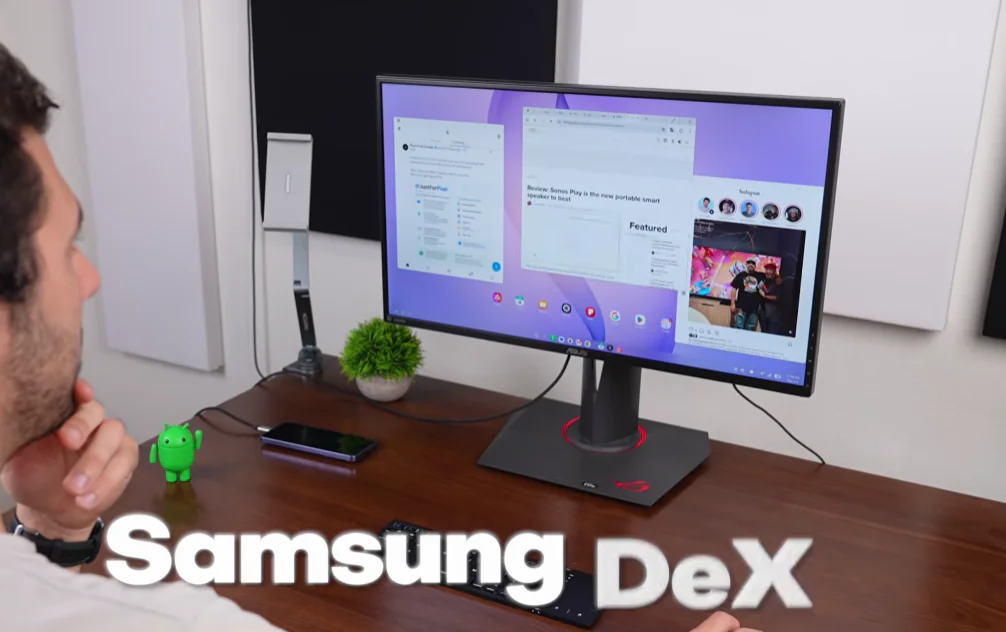
Samsung DeX becomes even more capable with One UI 9.
Easier Window Management
Users can:
- Move windows between desktops
- Organize workflows better
- Improve productivity
Desktop Previews
Recent Apps now show desktop previews.
This allows faster navigation between workspaces.
For professionals using Galaxy devices as productivity tools, these upgrades are particularly valuable.
Location Privacy Enhancements
Privacy remains a major focus of One UI 9.
New Location Indicator
Whenever an app accesses location data:
- A blue indicator appears
- Users receive visual confirmation
- Activity becomes transparent
Quick Access Controls
Users can:
- Identify active apps
- View location access instantly
- Stop access immediately
This mirrors existing camera and microphone indicators.
Accessibility Features Receive Major Attention

Samsung continues investing heavily in accessibility.
Text Spotlight
One standout addition is Text Spotlight.
Users can:
- Tap text anywhere
- Instantly enlarge content
- Improve readability
This feature benefits:
- Seniors
- Visually impaired users
- Readers of small text
Improved Keyboard Accessibility
Physical keyboard users gain:
- Additional shortcuts
- Better navigation
- Mouse cursor controls
- Adjustable cursor behavior
These improvements enhance productivity and accessibility.
Select to Speak

Another valuable addition is Select to Speak.
Capabilities
Users can:
- Select text
- Highlight images
- Receive spoken descriptions
- Hear content read aloud
This creates a more inclusive smartphone experience.
Samsung Apps Receive Significant Upgrades
Beyond system changes, One UI 9 updates many Samsung applications.
Modes and Routines Improvements
Automation becomes easier to understand.
Discover Page Enhancements
Routines now include descriptions explaining:
- What each automation does
- How it works
- Why it might be useful
This removes much of the guesswork for new users.
My Files App Enhancements

The My Files app receives both functional and visual improvements.
Better Layout
Samsung has:
- Reorganized icons
- Improved navigation
- Refreshed visuals
Built-In File Viewing
Users can now open:
- PDF files
- Text documents
directly inside My Files.
This reduces dependence on third-party apps.
Smarter Search Capabilities
Search functionality receives a substantial boost.
Users can now search:
- File names
- PDF contents
- Text documents
- Image text
For example, searching for “dog” can locate:
- Files named dog
- PDFs containing dog
- Images containing dog-related text
This significantly improves file discovery.
Samsung Notes Gets Useful Upgrades

Samsung Notes remains one of Samsung’s strongest productivity apps.
Tape Tool
A new tape tool allows users to cover content.
Users can customize:
- Size
- Pattern
- Thickness
This feature is particularly useful for studying and note organization.
Improved Notes Widgets
List widgets now include:
- Quick note creation buttons
- Faster note access
- Improved workflow efficiency
Students and professionals will appreciate these upgrades.
Weather App Improvements

The Weather application also receives refinements.
Updated Layouts
Changes include:
- Smaller health cards
- Redesigned weather elements
- Better information density
These tweaks help the app look cleaner and more modern.
One UI 9 Performance and Stability

One of the most encouraging aspects of One UI 9 is performance.
Early beta testing suggests:
- Smooth operation
- Strong responsiveness
- Reliable multitasking
- Excellent animation fluidity
Even with numerous new features, Samsung appears to have maintained system stability.
How to Install One UI 9 Beta
Users interested in testing One UI 9 can join Samsung’s beta program.
Steps
- Open Samsung Members.
- Scroll through available banners.
- Locate the One UI 9 Beta Program.
- Enroll your device.
- Download the update when available.
Availability depends on:
- Region
- Device model
- Samsung’s rollout schedule
Final Thoughts: Is One UI 9 Worth the Upgrade?
Based on everything revealed so far, One UI 9 is shaping up to be one of Samsung’s most comprehensive software updates.
Instead of focusing on one revolutionary feature, Samsung has improved nearly every corner of the user experience.
The combination of:
- Driving Report
- Enhanced AI tools
- Redesigned Quick Settings
- Better privacy controls
- Gaming improvements
- Accessibility upgrades
- Samsung DeX enhancements
- Smarter Samsung apps
creates an update that feels polished, practical, and genuinely useful.
For Galaxy users, One UI 9 represents another major step toward a smarter, more connected, and more personalized Android experience. While additional features may arrive before the final release, the current beta already demonstrates Samsung’s commitment to delivering one of the most feature-rich Android experiences available today.